微信小程序——自定义select选择器
微信小程序 | December 22, 2020
文章链接:https://blog.csdn.net/qq_43201350/article/details/111505653
wxml文件
<view class='select_box'>
  <view class="select" catchtap='selectTap'>
    <view class="select-part">
      <text class='select_text'>{{ index !=-1 ? selectData[index] : '选择喜欢的水果'}}</text>
      <icon iconClass="icontongyong_jiantouxiangxia" class="iconarrow-top" wx:if="{{!isSelected}}"></icon>
      <icon iconClass="iconarrow-top" class="iconarrow-top" wx:if="{{isSelected}}"></icon>
    </view>
    <image class='select_img {{show&&"select_img_rotate"}}' src=''></image>
  </view>
  <view class='option_box' style='height:{{show?(selectData.length>5?300:selectData.length*60):0}}rpx;'>
    <text class='option' style='{{index==selectData.length-1&&"border:0;"}}' wx:for='{{selectData}}' wx:key='this'
      data-index='{{index}}' catchtap='optionTap' data-text='{{item}}'>{{item}}</text>
  </view>
</view>
js文件
// minePck/pestsInterrogation/pestsInterrogation.js
Page({

  /**
   * 页面的初始数据
   */
  data: {
    show: false, //控制下拉列表的显示隐藏,false隐藏、true显示
    isSelected: false,
    selectData: ['苹果1', '苹果2', '苹果3', '苹果4', '苹果5', '苹果6', '苹果7', '苹果8', '苹果9', '苹果10'],
    index: -1, //选择的下拉列表下标
  },
  	// 点击下拉显示框
	selectTap(e) {
		console.log(e.detail)
		this.setData({
			show: !this.data.show,
			isSelected: false
		});
  },
  	// 点击下拉列表
	optionTap(e) {
		const that = this
		console.log('我选择了!')
		let Index = e.currentTarget.dataset.index; //获取点击的下拉列表的下标
		console.log(e.currentTarget.dataset.text)
		console.log(Index)
		this.setData({
			index: Index,
			show: !this.data.show,
			isSelected: true
		});
	},

})
wxss文件
.select_box{
  background: #fff;
  margin: 30rpx auto;
  position: relative;
 }
 .select{
  box-sizing: border-box;
  width: 100%;
  height: 70rpx;
  border:1px solid #efefef;
  border-radius: 8rpx;
  display: flex;
  align-items: center;
  /* padding: 0 20rpx; */
  padding-left: 15rpx;
 }
 .select-part {
   display: flex;
   justify-content: space-between;
   /* border: 1rpx solid red; */
   /* margin-left: 20rpx; */
    width: 301rpx;

  }
 .select_text{
  font-size: 30rpx;
  flex: 1;
 }
 .select_img{
  width: 40rpx;
  height: 40rpx;
  display: block;
  transition:transform 0.3s;
 }
 .select_img_rotate{
  transform:rotate(180deg);
 }
 .option_box{
  position: absolute;
  top: 70rpx;
  width: 100%;
  border:1px solid #efefef;
  box-sizing: border-box;
  height: 0;
  overflow-y: auto;
  border-top: 0;
  background: #fff;
  transition: height 0.3s;
 }
 .option{
  display: block;
  line-height: 40rpx;
  font-size: 30rpx;
  border-bottom: 1px solid #efefef;
  padding: 10rpx;
 }
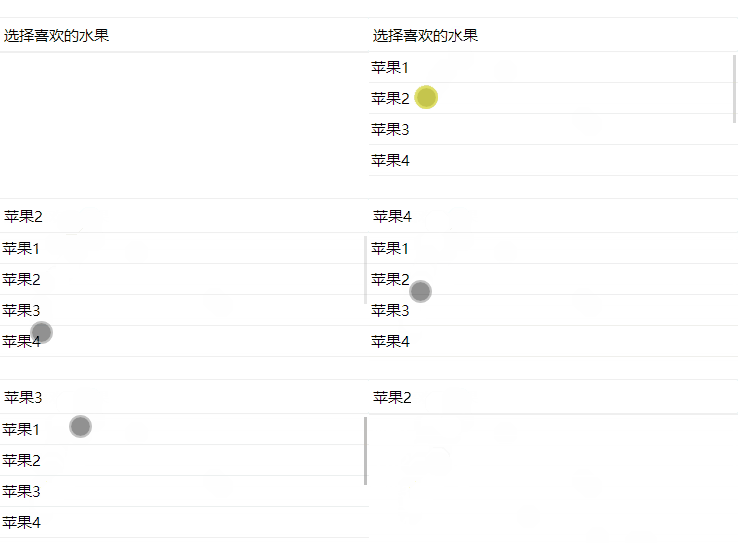
效果: