微信小程序——api接口的配置
微信小程序 | September 12, 2020
文章链接:https://blog.csdn.net/qq_43201350/article/details/108545681
1.新建一个文件夹,应包含以下文件
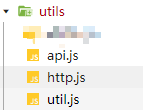
util.js文件
module.exports = {
}
http.js文件
const HTTP = amount => {
	const app = getApp()
	return new Promise(function (resolve, reject) {
		wx.showLoading({
			title: '加载中',
		})
		console.log(app.globalData.token)
		wx.request({
			header: {
				'content-type': 'application/x-www-form-urlencoded',
				'access_token': app.globalData.token
				// 'access_token': wx.getStorageSync('token')
			},
			...amount,
			success: function (res) {
				if (res.data.status == '200' || res.data.status == '999064' || res.data.status == '999056' || res.data.status == '999057') {
					resolve(res.data)
				}
			},
			fail: function (err) {
				wx.showToast({
					title: '请求出错',
					icon: 'none',
					duration: 2000
				})
				reject();
			},
			complete: function () {
				wx.hideLoading()
			}
		})
	})
}
module.exports = HTTP
app.js文件
const HTTP = require('./http.js');
const API_BASE_URL = "http://192.168.1.1/aa/aa" // 接口地址
module.exports = {

aa: (params ={}) => { // 接口1
		return HTTP({
			url: API_BASE_URL + '/user/aa',
			method: 'POST',
			data: params
		})
	},
bb: (params = {}) => { // 接口2
		return HTTP({
			url: API_BASE_URL + '/job/bb',
			method: 'GET',
			data: params
		})
	},
cc: (params){
        return HTTP({ // 接口3
            url: API_BASE_URL + '/api/app/cc/' + params.orchardId,
            method: 'GET'
        })
    },
}
在其它页面中调用接口
app.js文件
	demo: function () { //获取openId
		const _this = this
		return new Promise(function (resolve, reject) {
			wx.login({
				success(res) {
					console.log(res);

				}
			})
		})
	},
在其它页面中调用接口
如在demo.js中调用 .js文件
const API = require('../../utils/api.js')
Page({
	demo: function() {
	API.aa({ // 此处放要传入的参数,如无参数可不传
	name: '1',// (接口要求的参数名字:要赋值的数据)
    user: '2'
}).then(res => {
	if (res.staus == 200) {
	console.log('调用接口成功!',res)
}
})
}
})